


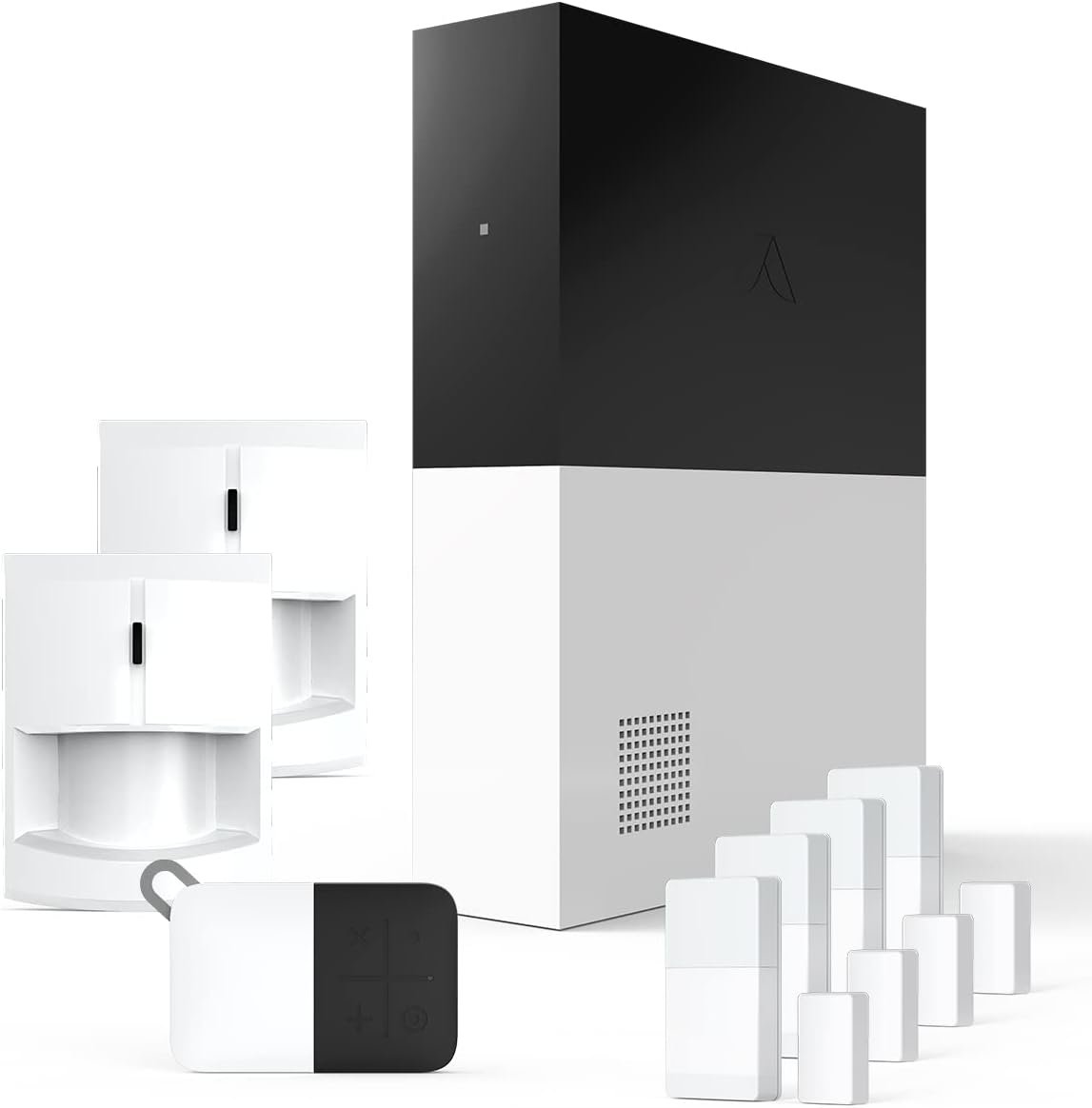




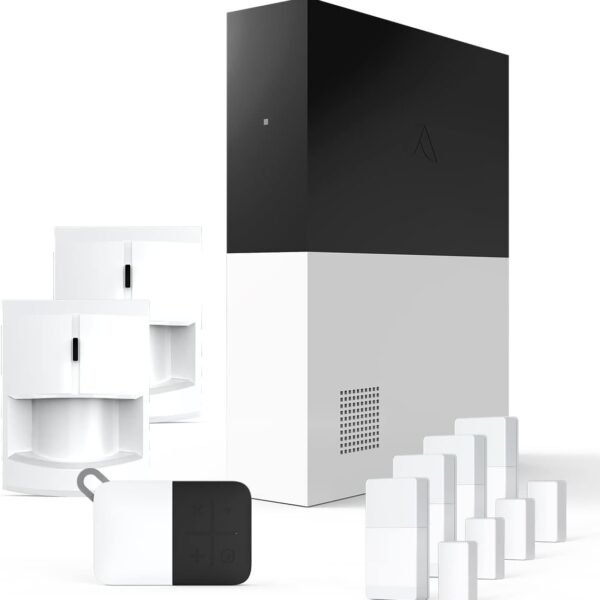
Abode 8 Piece Wireless Smart Security System – Works with Apple HomeKit, Z-Wave and Zigbee Devices – Expandable to Protect Your Whole Home – Easy DIY Installation – Optional Professional Monitoring
Original price was: $280.92.$209.99Current price is: $209.99.
Price: $280.92 - $209.99
(as of Jul 03, 2025 07:04:33 UTC – Details)
Product Description
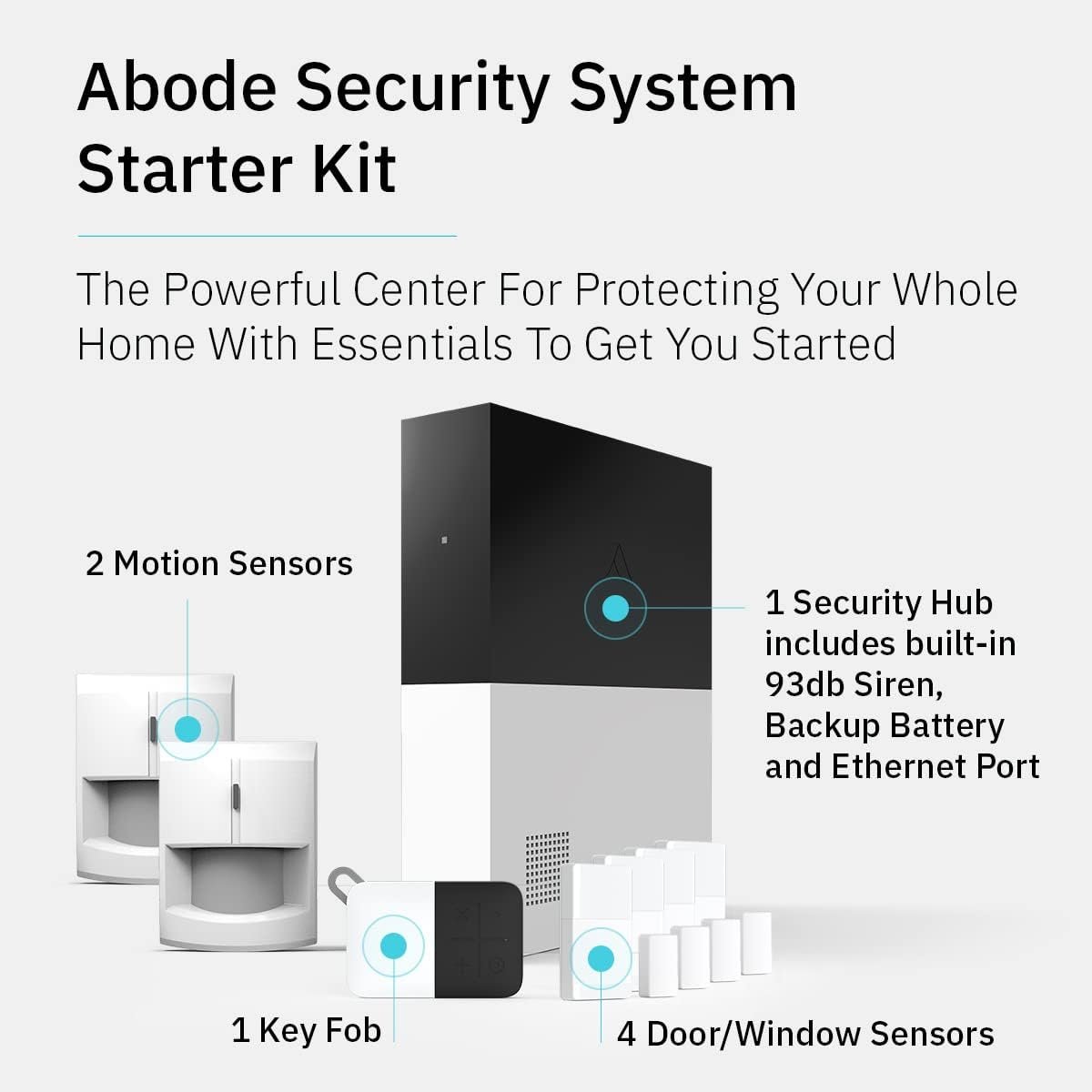
INDUSTRY LEADING WHOLE HOME SECURITY – Abode’s Smart Security System is expandable to meet your exact needs, and works with more security accessories and smart home products than any competitor. The 8-piece kit includes a central security hub (with a built-in 93dB siren, backup battery, and reliable ethernet connectivity), 2 motion sensors, a key fob, and 4 mini door/window sensors. Works with Alexa, Google Assistant, and Siri.
WORKS WITH APPLE HOMEKIT – the Smart Security System remains the only home security system (DIY or pro) that has been tested and certified for Works with Apple HomeKit, and can be monitored and controlled via the iOS Home app.
CUSTOMIZE YOUR SECURITY SYSTEM — add additional Abode sensors or cameras to monitor all accessible doors/windows, water leaks, smoke detectors, CO2 alarms and more.
Z-WAVE & ZIGBEE SMART HOME HUB – In addition to the large ecosystem of Abode products you can add to this system, the Smart Security Hub controls Z-Wave and Zigbee compatible smart accessories like locks, lights and devices with sensors.
PROFESSIONAL MONITORING — add 24/7 professional monitoring for as little as 60 cents per day to automatically dispatch police, fire and medical help when needed. Qualifies for insurance discount.
Customers say
Customers find the security system easy to set up with a simple app interface and appreciate its functionality, with one customer noting seamless device integration. They consider it affordable and reliable, with one mentioning it can be armed/disarmed verbally. The motion sensors receive mixed feedback – while some find them fantastic, others report they never sense motion correctly. The built-in alarm is very loud, and while the app quality is generally positive, one customer finds it frustrating.
3 reviews for Abode 8 Piece Wireless Smart Security System – Works with Apple HomeKit, Z-Wave and Zigbee Devices – Expandable to Protect Your Whole Home – Easy DIY Installation – Optional Professional Monitoring
Related products
32GB FRAMEO 10.1 Inch Smart WiFi Digital Photo Frame 1280×800 IPS LCD Touch Screen, Auto-Rotate Portrait and Landscape, Built in 32GB Memory, Share Moments Instantly via Frameo App from Anywhere
In stock



Hisense 75-Inch Class U6 Series Mini-LED ULED 4K UHD Google Smart TV (75U6N, 2024 Model) – QLED, Motion Rate 240, HDR 10+, Full Array Local Dimming, Game Mode Plus, Alexa Compatibility
In stock

I16 PROMAX Unlocked Phone,8+256GB Smartphone, Android 13.0, Long Battery Life 7000mAh,6.99″ Display 68+108MP Zoom Camera,with Dual SIM, Fingerprint Lock, Face ID, 5G Phone (White)
In stock

TCL 65-Inch QM85 QLED 4K Smart QD-Mini LED TV with Google TV (65QM851G, 2024 Model) Dolby Vision IQ HDR, Dolby Atmos, Game Accelerator up to 240Hz, Voice Remote, Works with Alexa, Streaming Television
In stock



:) –
Excellent Security System for Your Home
This security system is probably the best home security system I’ve had the opportunity to use thus far. The quality of the equipment is excellent. Customer support is great if you need them. Setting up a monitored services is very easy.As far as the sensor quality goes, I find they are more sensitive than Blue by ADT – this is a good thing, if your door opens you want the sensor and the system go off. The base station appears to be louder than ADT, Vivint, or Nest Secure. The keypad is great too, it looks good and feels well build (purchased separately)Attaching sensors to the system is a breeze. I’ve had less trouble setting this system up when compared to other DIY systems from ADT (Blue by ADT) and Nest Secure. Expanding the system is easy, something you cannot do by yourself with Vivint or at least couldn’t when I was a customer. You’d have to call and pay to have a tech come out.This system isn’t the cheapest to purchase, but it is definitely the cheapest from a home monitoring fee perspective – unless of course you get some type of discount monitoring special that continues indefinitely.One thing I will note is that while you look for home monitoring services you want to make sure there is active monitoring of your system if you’re paying for it. With Vivint, Blue by ADT and Nest Secure (monitored by Brinks) I have at one point or another set off my alarm where there should have been a response from dispatch at the monitoring company. Not that it warranted a police response but a call to your phone or emergency contacts was. All of the aforementioned companies failed to respond. Granted two were DIY but one was professionally installed and all were professionally monitored. When I called them about it the response was “well on our side your alarm system didn’t send any signals”. This is disturbing to me and should be to you if you have an alarm to protect your home and loved ones. I will note that Blue by ADT and Vivint did try to fix the issues with the system and also offered free months of monitoring service to make up for it. Vivint only offered a few months of free service after I contacted the Better Business Bureau. Brinks offered nothing for the aforementioned issue.Just want to point out that this is my experience with Abode thus far and no I’m not being paid by anyone at Abode nor have I received free product.
Rob McMillan –
Lives up to every positive review I found and it beat my expectations
I spent close to 5 hours researching reviews on Amazon and via various consumer reports before I committed to buying my 2nd alarm system. I had a list of every feature that I wanted in a DIY system and this was the only one that met my expectations coming out of the gate. I’m not a techy-type, I have little spare time for home projects and about zero patience, so my expectations where pretty high. Setting up the alarm system (including the 3 abode mini door sensors, 2 abode plug-in outlets, 2 light bulbs, and a camera) took a total of 20 minutes. The hardest part was coming up with another password to remember. Some will understand this, but I set this entire thing up without cussing once! That alone is amazing!!! Okay, the only negative thing and this was not a shocker was the camera issue. I did NOT go with an abode cam because I didn’t feel they had evolved enough yet to what I wanted. I did get one, but it’s not yet compatible. So, what happens? I get a notify of activity via abode and simply turn on the camera app. Easy fix! So, here are my only observations and to me, they aren’t deal breakers. When adding a new device on the log-in page, I wasn’t able to back-page when wanting to add more. No big deal. I just re-logged in or removed the extra verbage in the address bar. This base system is a just a little more expensive than others, but I got exactly what I wanted/needed. I own the fact that I’m a born cheap skate, but after previously spending over $400 on a system that was essentially just a security cam, I wasn’t going to make the same mistake again. If you like bargains and value your hard earned money like I do, this is my advice to you: This will be money very well spent! The optional IFFTT set-up (the ICING on this delicious cake) was a little more challenging b/c I wasn’t familiar with it, but a quick internet search of “How do I set up IFFTT” solved it. The fact that I’m leaving a review (for those who know me) says a lot. 1.) I would buy this again without hesitation. 2.) I would recommend this to friends/family. 3.) It was too easy to set-up – to the point of making me wonder if I did something wrong…. It gets a solid grade A and I look forward to adding on more abode gadgets as money permits~
Fatty –
Nice HomeKit integration.
Only installed for 3 days. Works well. Bought it to get hidden door sensors into HomeKit. Someone should make those. Seems easy enough to set up sensors respond quickly in HomeKit. One thing to know. You have to delete the system in HomeKit and re add to get added sensors to show up. This could be a pain. Must redo automations etc. other than that it’s a keeper.